
SO-ARM101 自动标定
在使用自动标定代码时,要注意标定的四周不要有障碍物阻挡。
我们仓库 lerobot 下 0.4 和 0.5 版本均更新了自动标定程序。0.5 代码目前在 dev 分支下,需要更新一下仓库。代码 0.4、0.5 通用。
shell
git pull                    # 更新仓库
pip install -e ".[tools]"   # 安装相关插件
在 lerobot/examples/calibrate 下放有命令行入口代码,可调整更多参数,具体参数说明见下方。建议使用默认参数,速度过快可能导致过载报错。
shell
cd lerobot/examples/calibrate
python auto_calibrate_example.py --port COM9 --device-type tele
同时我们也增加了 UI 页面版本,推荐使用。安装好包之后可以快捷启动:
shell
lerobot-auto-calibrate-ui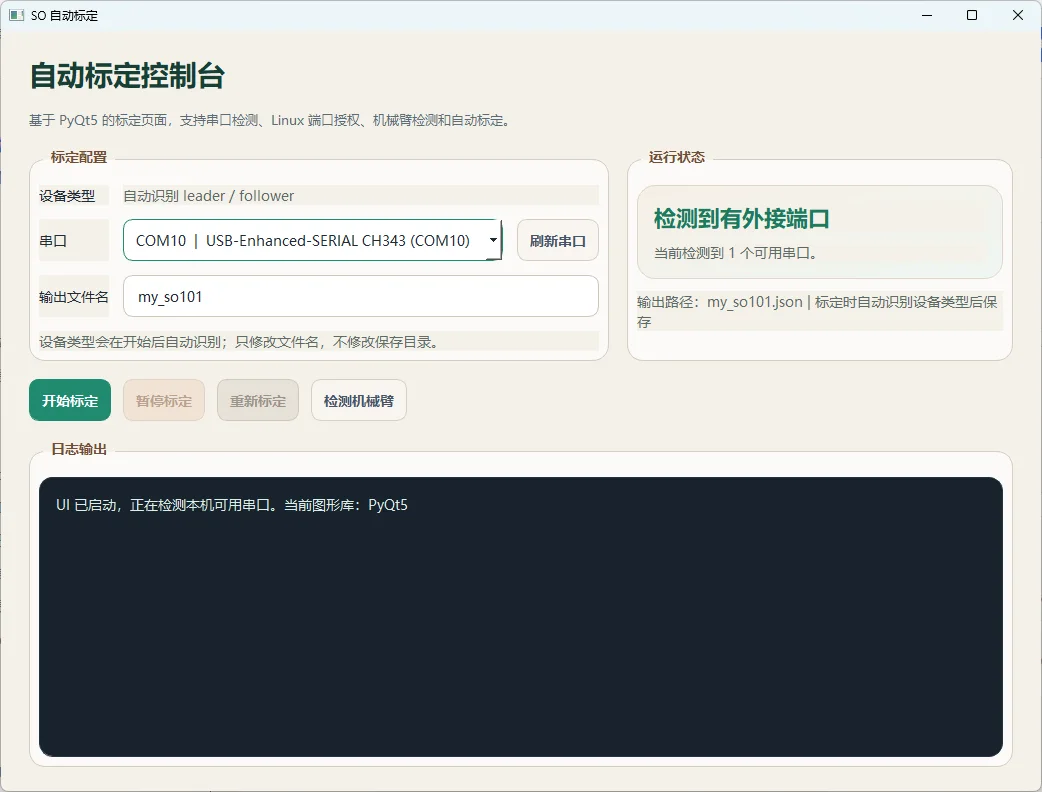
1. Auto Calibrate 使用说明
本文档说明如何使用 auto_calibrate.py 和 auto_calibrate_example.py 对 SO-ARM101 设备执行自动标定。
当前示例脚本已改成命令行参数模式,支持两类设备:
tele: SO-ARM101 Leader / 遥操作器robot: SO-ARM101 Follower / 机械臂
1.1 功能概览
自动标定脚本完成以下工作:
- 连接设备
- 逐个关节探索机械边界
- 计算
homing_offset、range_min、range_max - 生成
MotorCalibration - 保存为 calibration JSON 文件
1.2 相关文件
| 文件 | 说明 |
|---|---|
auto_calibrate.py |
自动标定核心逻辑 |
auto_calibrate_example.py |
命令行入口示例 |
1.3 命令行参数
必选参数:
| 参数 | 说明 |
|---|---|
--port |
串口号,例如 COM9 |
--device-type |
设备类型:tele 或 robot |
可选参数:
| 参数 | 说明 | 默认值 |
|---|---|---|
--id |
设备 ID | my_so101 |
--calibration-dir |
标定文件输出目录 | — |
--try-torque |
尝试扭矩 | 见下方默认值 |
--max-torque |
最大扭矩 | 见下方默认值 |
--torque-step |
扭矩步进 | 见下方默认值 |
--explore-velocity |
探索速度 | 见下方默认值 |
--wait-time-s |
等待时间 | 见下方默认值 |
--velocity-threshold |
速度阈值 | 见下方默认值 |
--position-tolerance |
位置容差 | 见下方默认值 |
--log |
是否输出 logger(true/false) |
true |
--yes |
跳过开始前的回车确认 | — |
1.4 默认参数
| 参数 | tele (Leader) | robot (Follower) |
|---|---|---|
try_torque |
400 | 600 |
max_torque |
500 | 1000 |
torque_step |
50 | 50 |
explore_velocity |
600 | 600 |
wait_time_s |
0.5 | 0.5 |
velocity_threshold |
4 | 4 |
position_tolerance |
4000 | 4000 |
1.5 终端输入示例
标定 tele
shell
python auto_calibrate_example.py --port COM9 --device-type tele标定 robot
shell
python auto_calibrate_example.py --port COM3 --device-type robot指定设备 ID
shell
python auto_calibrate_example.py --port COM9 --device-type tele --id my_so101覆盖默认扭矩参数
shell
python auto_calibrate_example.py --port COM9 --device-type tele --try-torque 300 --max-torque 450覆盖多个参数
shell
python auto_calibrate_example.py --port COM3 --device-type robot \
  --try-torque 500 --max-torque 800 --explore-velocity 500 --wait-time-s 0.7
跳过确认提示
shell
python auto_calibrate_example.py --port COM9 --device-type tele --yes关闭终端 logger 输出
shell
python auto_calibrate_example.py --port COM9 --device-type tele --log=false1.6 执行流程
- 根据
--device-type创建对应配置对象(tele→SO101LeaderConfig,robot→SO101FollowerConfig) - 根据设备类型加载对应默认标定参数
- 如果命令行给了可选参数,则覆盖默认值
- 默认在终端输出 logger(传
--log=false可关闭) - 连接设备并执行自动标定
- 保存标定结果到设备对应的 calibration 文件路径
1.7 输出结果
标定成功后,终端会输出每个电机的结果,例如:
text
电机: shoulder_pan
  ID: 1
  Homing Offset: -1396
  Range Min: 620
  Range Max: 3440
保存后的 JSON 结构:
json
{
  "shoulder_pan": {
    "id": 1,
    "drive_mode": 0,
    "homing_offset": -1396,
    "range_min": 620,
    "range_max": 3440
  }
}
1.8 常见问题
MotorCalibration 是什么?
标定函数返回 MotorCalibration 对象,内部字段包括 id、drive_mode、homing_offset、range_min、range_max。
tele 和 robot 的区别?
tele默认扭矩更保守,适合 Leader 轻负载场景robot默认扭矩更大,适合 Follower 负载场景
start_torque 参数?
当前版本实际主要使用的是 try_torque、max_torque、torque_step,优先关注这几个参数。
1.9 安全建议
开始标定前建议确认:
- 机械臂周围没有障碍物
- 电源稳定
- 串口连接正常
- 知道如何快速断电
- 肩部和肘部等大负载关节先用更保守的参数测试
如果出现 OverEle error、过流、卡死、持续顶住边界等现象,先降低 try_torque、max_torque、explore_velocity。
1.10 推荐调参起点
| 设备 | 命令 |
|---|---|
| tele | python auto_calibrate_example.py --port COM9 --device-type tele --try-torque 300 --max-torque 400 --explore-velocity 400 |
| robot | python auto_calibrate_example.py --port COM3 --device-type robot --try-torque 400 --max-torque 600 --explore-velocity 400 |